
Description
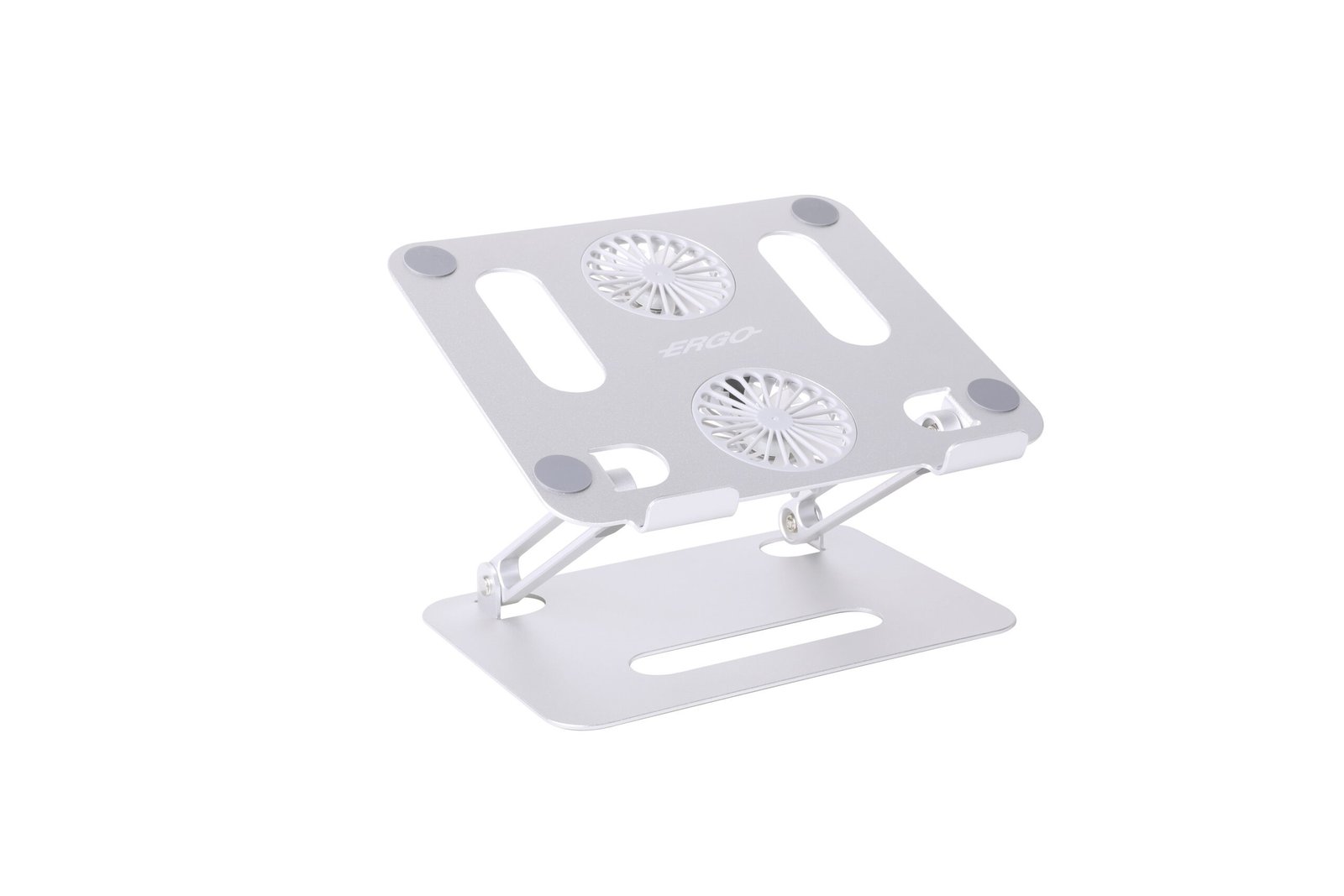
Adjustable Laptop Stand with Two Cooling Fans
Family: Risers & Stands Category: Laptop Stands Color: Silver
Raise and angle your laptop on a folding aluminum stand with two fans beneath the support platform. Manual hinged adjustment sets the viewing position, while the USB-powered fans add airflow around the laptop underside.
Is This Right for You
For users who want a raised laptop display and additional airflow at a desk. Check that the fan positions suit the laptop’s underside vents. Use a separate keyboard and mouse for extended work with the screen raised.
Key Benefits
- Hinged adjustment changes the platform height and angle to suit the working position.
- Two powered fans move air beneath the laptop while platform openings provide ventilation clearance.
- The folding structure reduces storage space when the stand is put away.
Compatibility and Installation
Published guidance covers laptops up to 17 inches weighing less than 4 kg. Verify the actual footprint, centre of gravity and underside against the platform and front stops. Keep the laptop’s vents clear. Use a firm, level desktop and check stability in the intended position before normal use.
Specifications and Adjustment
| Specification | Details |
| Installation | Freestanding desktop stand |
| Laptop size guidance | Up to 17 inches; physical fit required |
| Laptop weight guidance | Less than 4 kg |
| Adjustment | Manual hinged height and platform-angle adjustment |
| Cooling arrangement | Two fans beneath the platform |
| Fan supply | 5 V DC via USB cable |
| Main materials | Aluminum alloy with silicone contact pads |
| Storage | Folding structure; folded dimensions to be confirmed |
Materials and Construction
Aluminum alloy forms the main support structure. Silicone pads cushion the laptop’s contact points and help limit sliding. Front stops support its lower edge. Inspect the hinges and contact pads regularly, and disconnect the fan supply before cleaning.
Setup and Everyday Use
- Open the stand on a level desk. Set the height and platform angle before loading it, and follow the matching instructions if hinge tension needs adjustment with the supplied Allen key.
- Place the laptop centrally behind the front stops. Check that it sits securely, that the support does not press on fragile areas, and that its vents remain unobstructed.
- Connect the supplied cable to a suitable 5 V USB source, following the product instructions. Leave cable slack and keep the fan openings clear. Remove the laptop and disconnect power before folding or transport.
Limitations
Cooling results depend on vent alignment, room conditions and laptop workload; no temperature reduction is guaranteed. Fan speed, noise, airflow, current draw and adjustment endpoints are not specified. Confirm these details when they matter to your application. Avoid soft surfaces and excessive force on an elevated platform. Power connection and lighting features should be checked for the selected version.
Package and Mounting Options
Laptop stand, USB cable and Allen key are listed for this configuration. Confirm the final pack list before ordering. A mains adapter is not specified. Laptop, keyboard and mouse are not included.
Installation Guidance and Warranty
Contact Jianvo with your device and installation details for the matching instructions, compatibility guidance and applicable warranty terms.
Bulk Orders and Customization
Request a quote with this Jianvo SKU, quantity, destination and required configuration. Include packaging or branding requirements so availability and lead time can be confirmed.
Frequently Asked Questions
Does the stand need power? Mechanical support works without power. The fans require a compatible 5 V USB supply.
Will it cool every laptop equally? No. The underside design and vent positions affect the benefit of added airflow.
Does a 17-inch screen guarantee a fit? No. Check weight, platform contact, front-stop engagement and stability in the intended position.
Alternative Jianvo Products
For the same task of raising a laptop, these stands offer alternatives when powered airflow is not required.
| Jianvo product | Shared purpose | When to choose it |
| JNV-LST-025-01 Adjustable Folding Laptop Stand |
Raises and angles a laptop display. | Choose a fan-free hinged platform for laptops up to 17 inches weighing less than 4 kg. It needs no power connection. |
| JNV-LST-032-01 Seven-Position Folding Laptop Stand |
Raises a laptop for desk use. | Choose a folding rail design with seven positions for compatible laptops up to 15.6 inches. It has no powered fans. |

Reviews
There are no reviews yet.