
Description
Folding Laptop Stand with Four Fans
Family: Risers & Stands Category: Laptop Stands Color: Gray
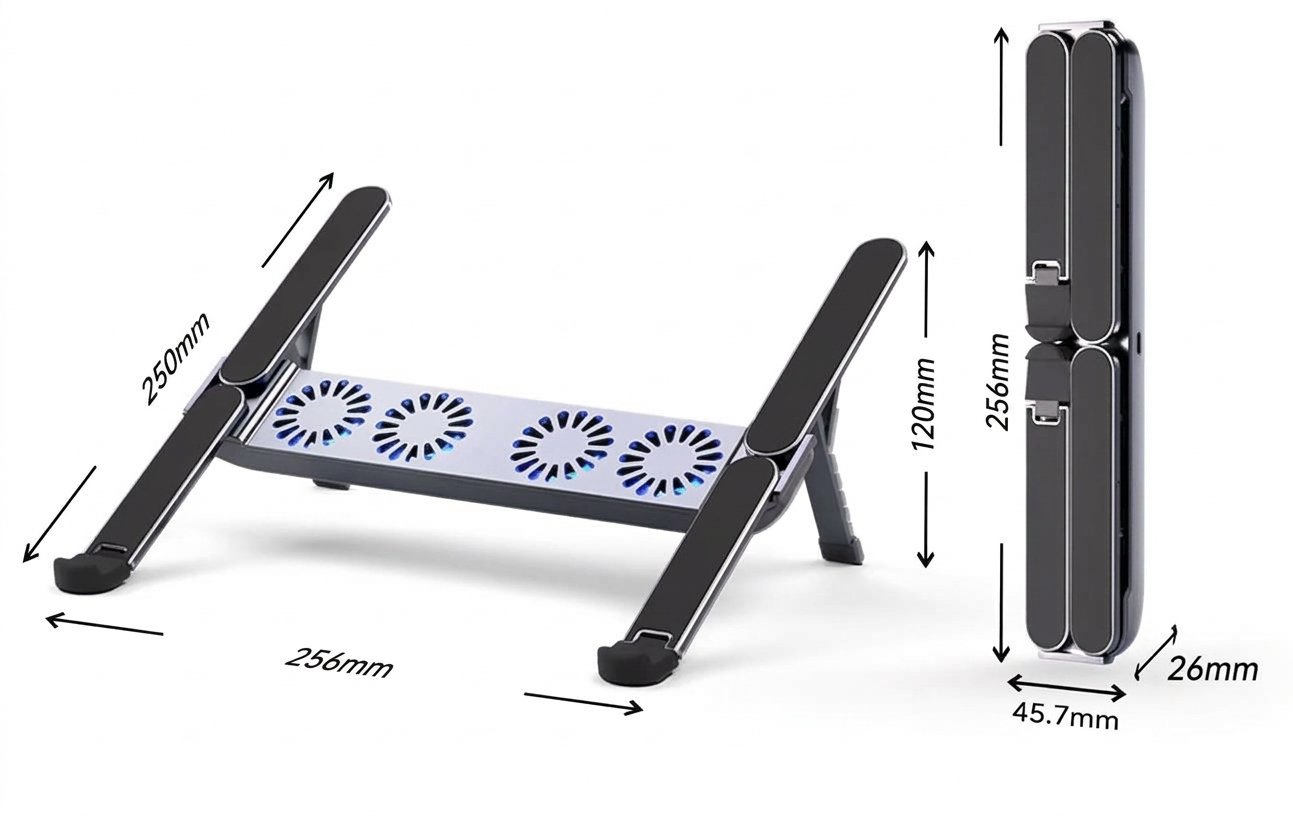
Raise a compatible laptop on two padded rails and add airflow beneath its base with four fans in the central crossbar. The gray aluminum stand combines adjustable support with a folding design for storage and transport.
Is This Right for You
Choose this version when you want a portable laptop support with powered airflow. Check the laptop footprint, underside vents, permitted weight and power connection before ordering; screen diagonal alone does not establish compatibility.
Key Benefits
- Four fans provide airflow beneath the laptop. The benefit depends on how their position matches the laptop air inlets.
- Adjustable rear supports let you choose an inclined working position. Use a separate keyboard and mouse when needed for comfortable typing.
- Padded rails and front stops support the laptop, while the hinged rails and rear supports fold around the central module.
Technical Specifications
| Specification | Details |
| Finish and main structure | Gray aluminum frame |
| Contact surfaces | Silicone rubber pads on the support rails |
| Cooling arrangement | Four fans in the central crossbar beneath the laptop |
| Adjustment | Six support positions shown for X5 MAX; confirm height and angle range for the supplied configuration |
| Folded dimensions | 256 × 45.7 × 26 mm in the X5 MAX dimensional reference; confirm the supplied configuration before ordering |
| Open dimensions | 256 × 250 × 120 mm in the X5 MAX dimensional reference; height is for the illustrated position |
| Net weight | Contact JIANVO for the confirmed weight of the supplied configuration |
| Laptop fit and load | Confirm the supported footprint and rated laptop weight for the supplied configuration |
| USB connector and cable | Confirm the stand-side connector, both cable ends, cable length and included cable before ordering |
| Electrical input and power | Confirm rated DC voltage, current and total power in watts for the fans and lighting |
| Fan illumination | Blue illumination appears in the X5 MAX product views; confirm the light color of the supplied unit |
| LED type and controls | Confirm fixed-color or RGB operation, lighting modes and whether lighting can be switched off separately |
| Fan controls and performance | Confirm speed adjustment, on/off control, fan size, speed, airflow and noise rating if these are selection requirements |
| USB data and laptop charging | Do not assume that the fan power connection also provides a USB hub, video output or laptop charging |
| Placement | Freestanding on a firm, level desk; use with unobstructed fan openings |
Materials and Construction
The aluminum frame carries the laptop on two padded support rails. Silicone contact pads help reduce sliding and contact marks. Front retaining stops support the lower edge; the central module houses the four fans. Keep the hinges, pads and fan openings clean.
Setup and Everyday Use
- Open the stand on a firm, level desk. Set both rear supports to matching positions and check that they are fully engaged.
- Position the laptop centrally on both rails with its front edge retained. Check stability and keep the laptop air inlets and exhaust clear.
- Use the cable and power source specified for the supplied unit. Keep cables and loose objects clear of the fans; confirm the electrical rating before connection.
- Remove the laptop and disconnect power before changing the setting, cleaning or folding. Fold the supports and rails without forcing the hinges or trapping the cable.
Limitations
Cooling results vary with vent placement, workload and room temperature; fan count does not establish cooling capacity or quietness. The stand needs a stable desk and is not a lap desk. Check clearances for thick cases and large laptops. Dimensions, electrical details and lighting must match the supplied configuration.
Package Contents
Laptop stand with a four-fan module. Confirm the included power cable, carrying pouch and any power adapter when ordering. Laptop, keyboard, mouse and other display accessories are not included.
Product Guidance and Warranty
Contact JIANVO with this SKU and your laptop model for configuration details, operating instructions and applicable warranty terms. For bulk orders, include quantity, destination and any packaging or branding requirements.
Frequently Asked Questions
How does this compare with the X5 PRO and X5 stands? X5 MAX adds four fans. X5 PRO (JNV-LST-030-01-G) offers a USB hub, while X5 (JNV-LST-030-02-G) is a passive stand. Each has its own specifications.
Can it work with the fans disconnected? The mechanical support can be used without powered airflow. Keep the laptop’s own vents unobstructed.
Will it fit my bag or connect to my laptop? Check the confirmed folded dimensions and cable connectors for your supplied configuration before ordering.
Alternative JIANVO Products
Choose an alternative for the same laptop support task by comparing the features that matter to your setup.
| JIANVO product | Shared purpose | When to choose it |
| JNV-LST-029-01 Dual Fan Folding Stand |
Angled laptop support with powered airflow | Two-fan design; compare fan placement, adjustment and laptop fit. |
| JNV-LST-030-01-G X5 PRO Hub Stand |
Folding laptop support | Choose for USB expansion when extra connections matter more than integrated fans. Verify the hub functions you need. |
| JNV-LST-030-02-G X5 Passive Stand |
Folding laptop support | Choose for simple mechanical support without powered fans or a hub. |



Reviews
There are no reviews yet.