
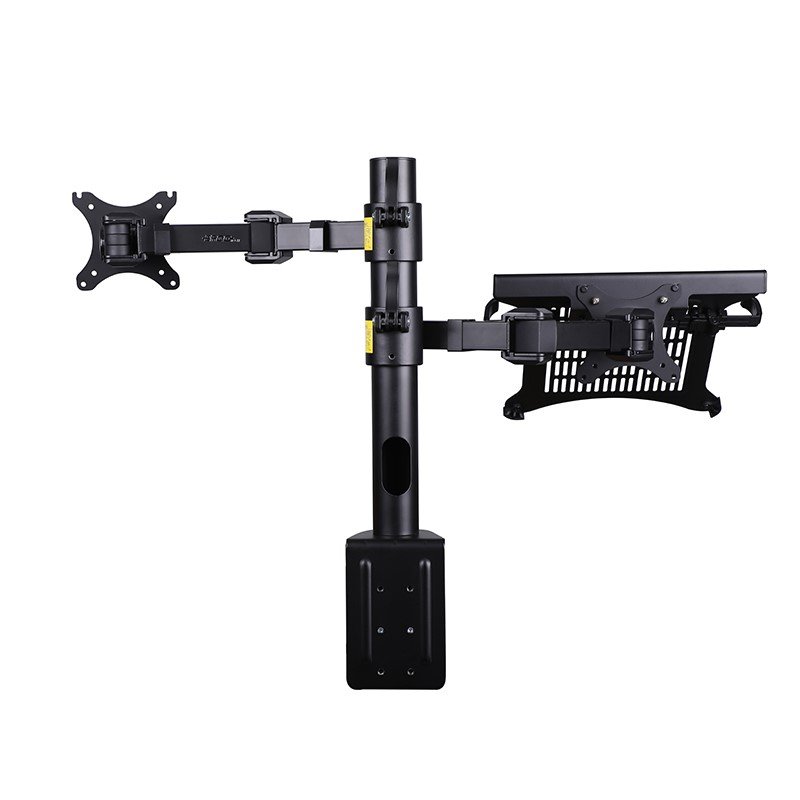
Description
Monitor and Laptop Desk Mount
Family: Mounts & Arms Category: Monitor & Laptop Mounts Color: Black
Arrange a monitor and an open laptop around one desk mounting point. Separate articulated supports let you set the two displays at different positions while leaving space beneath them for everyday desk work.
Is This Right for You
For a workstation that uses a laptop alongside an external display. Choose it when both devices need dedicated supports on a suitable desk edge. A separate keyboard and mouse let you use the raised laptop without reaching up to its built-in keyboard.
Key Benefits
- One mounting point serves both devices, reducing the need for separate desktop bases.
- Separate pole collars and articulated joints allow different display positions.
- A ventilated laptop tray and cable routing help organize the working area.
Compatibility and Installation
Check monitor weight without its original stand, rear VESA holes, screw depth and connection clearance. Verify the laptop footprint, thickness and contact points against the tray and retainers. Before ordering, confirm the clamp opening and under-desk clearance for your desk. Both clamp faces need a sound, flat supporting surface.
Specifications and Adjustment
| Specification | Details |
| Monitor compatibility | 17–30 inches; maximum 10 kg |
| Laptop compatibility | Up to 17 inches; maximum 4 kg; physical fit required |
| Monitor VESA pattern | 75 × 75 or 100 × 100 mm |
| Mounting | Desk-edge clamp on a shared vertical pole |
| Adjustment mechanism | Manual pole-height and articulated-joint adjustment |
| Published horizontal movement | Monitor head ±90°; movement around pole ±180° |
| Main materials | Aluminum structure with silicone contact pads |
| Laptop support and cables | Ventilated tray with retainers; cable routing |
Materials and Construction
The aluminum structure supports the articulated layout. Silicone contact pads cushion contact with the laptop and help reduce sliding. The tray openings leave space for airflow. Keep vents clear and inspect pads, retainers and fasteners during routine care.
Setup and Everyday Use
- Fit the clamp to a compatible desk and assemble the pole and supports using the matching instructions. Check the desk structure and all fasteners before adding either device.
- Attach the monitor using the correct VESA screws. Place the laptop centrally on its tray and engage its retainers without obstructing ports. Support each device while adjusting its pole collar or joints.
- Set viewing positions with clearance between devices and nearby furniture. Secure the adjustments, then route cables with enough slack for movement. Check stability before normal use.
Limitations
The monitor and laptop have separate load limits; unused capacity on one support cannot be transferred to the other. Screen size alone does not establish fit. Height changes require manual adjustment and secure locking. Ask Jianvo for exact height, reach, tilt limits and tray dimensions when these determine your layout. Tray ventilation is passive and does not guarantee cooling performance.
Package and Mounting Options
Combined desk mount with a monitor attachment and laptop tray. Confirm the supplied clamp components, device screws and tools against the selected kit. Other mounting methods require separate confirmation. Display devices, keyboard and mouse are not included.
Installation Guidance and Warranty
Contact Jianvo with your device and installation details for the matching instructions, compatibility guidance and applicable warranty terms.
Bulk Orders and Customization
Request a quote with this Jianvo SKU, quantity, destination and required configuration. Include packaging or branding requirements so availability and lead time can be confirmed.
Frequently Asked Questions
Can it hold a monitor and laptop together? Yes, subject to each device’s fit and its separate load limit.
Is height adjusted by a gas spring? This model uses manual adjustment on the pole and articulated joints.
Will it fit my desk? Send Jianvo the desk thickness, edge profile and underside clearance so the clamp fit can be checked.
Alternative Jianvo Products
For the same two-device workstation, consider the following pair of separate Jianvo supports. Both products are needed to replace the combined mounting arrangement.
| Jianvo product | Shared purpose | When to choose it |
| JNV-MAR-003-01 Monitor Arm + JNV-LST-025-01 Folding Laptop Stand |
Positions a compatible monitor and raises a laptop display. | Choose separate placement: the monitor arm clamps to the desk and the laptop stand rests on it. The stand supports laptops up to 17 inches weighing less than 4 kg and uses desktop space. |
Reviews
There are no reviews yet.