

Description
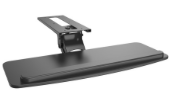
Adjustable Under Desk Keyboard Tray
Family: Workspace Accessories Category: Keyboard Trays Color: Black
Position the keyboard beneath the desktop with adjustable width, height, tilt and swivel. A sliding track brings the tray into use and lets it retract when space is needed at the front of the workstation.
Is This Right for You
For desks with enough clear underside depth for the track and enough knee clearance for the tray, where several keyboard-position adjustments are useful.
Key Benefits
- A sliding mouse extension changes the total working width from 465 to 645 mm.
- Tilt and swivel help orient the surface around the seated working position.
- A 300 mm track travel changes how far the tray extends from its mounting position.
Compatibility and Installation
Check the full mounting footprint against desk crossbars, drawers, control boxes and cable trays. Measure the keyboard and mouse together against the usable surface. Confirm screw length and desktop construction before fixing the track.
Specifications and Adjustment
| Specification | Details |
| Tray size | 465 to 645 x 240 mm |
| Maximum combined load | 5 kg |
| Overall assembly dimensions | 465 to 645 x 743 x 185 mm |
| Height adjustment travel | 155 mm; not absolute height endpoints |
| Tilt | 15 degrees upward and 15 degrees downward |
| Swivel | 180 degrees in either direction |
| Track travel | 300 mm |
| Materials and color | Steel and plastic; black |
Materials and Construction
A powder-coated steel mechanism supports a plastic tray assembly. The mounting track transfers the tray and hand-contact forces to the desktop; sound fixing is as important as the stated equipment load.
Setup and Everyday Use
- Measure the keyboard, mouse area, underside mounting space and knee clearance.
- Fix the track using the specified mounting points and suitable screw depth.
- Set tray width, height and angle, then secure the adjustment mechanism.
- Check normal typing movement and retraction without touching the desk frame or pulling device cables.
Limitations
The 155 mm figure describes height adjustment travel; it does not mean the tray sits 155 mm below every desktop. Keep the keyboard and mouse within the 5 kg combined load. Do not use the tray to support body weight.
Package and Mounting Options
One black adjustable tray and mounting mechanism. Confirm assembly fittings in the quotation. Keyboard, mouse and desktop are not included.
Installation Guidance and Warranty
Contact JIANVO for the matching installation or care instructions, spare-part availability and warranty terms applicable to your order.
Bulk Orders and Customization
Send JIANVO the product code, quantity, delivery destination and packaging requirements. Availability, lead time and customization are subject to quotation.
Frequently Asked Questions
Does 743 mm describe the keyboard surface depth? No. It is an overall assembly dimension; the tray depth is 240 mm.
Will it fit an adjustable desk? Check the specific desk frame, control box and moving cables; desk type alone does not guarantee fit.
Is the mouse area included in the load limit? Yes. The keyboard, mouse and other supported items must remain within the 5 kg total.
Alternative Jianvo Products
Compare these Jianvo products for the same task. Check device compatibility and installation requirements before switching.
| Jianvo product | Shared purpose | When to choose it |
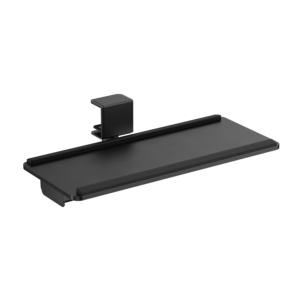
| JNV-KBT-054-01 | Position keyboard and mouse at the desk | Choose a clamp-mounted option with a fixed 635 x 270 mm platform. |
| JNV-KBT-053-01-B | Store input devices beneath the desk | Choose a simpler fixed-width sliding tray when adjustable tilt and height are unnecessary. |


Reviews
There are no reviews yet.