
Description
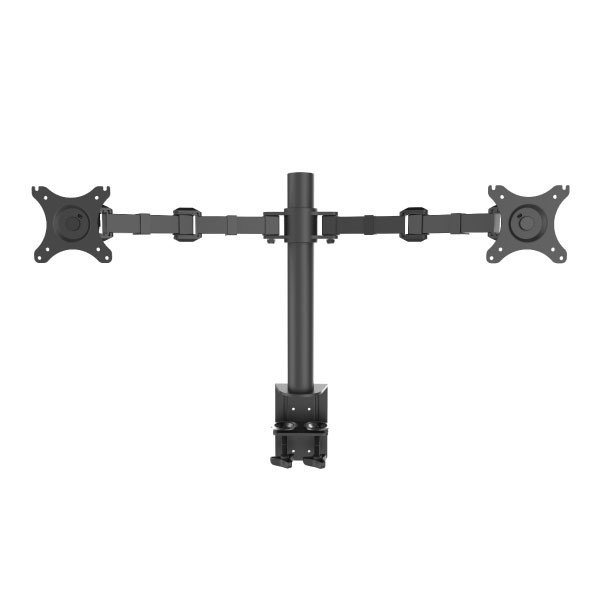
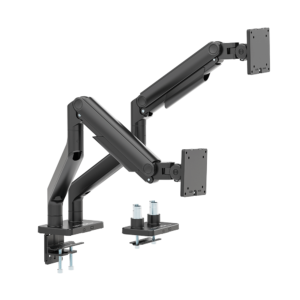
Articulating Dual Monitor Arm
Family: Arms & Mounts Category: Monitor Arms Color: Black
Build a two-monitor work area with one desk clamp and a manually positioned support. Articulated arms let you angle the displays for side-by-side tasks, while the height lock holds the chosen working level.
Is This Right for You
For two screens that normally stay at a set height, such as a main display and a reference display. Choose this manual design when frequent height changes are unnecessary and you want to remove both original monitor bases.
Key Benefits
- Position two screens from one desk mounting point.
- Articulated arms and rotating screen mounts help align the displays for your tasks.
- A manual height lock and cable routing keep the working arrangement organized.
Compatibility and Installation
Check both monitors for weight without their original stands, VESA holes and screw depth. Confirm the screen widths fit your intended layout. The desktop and clamp position must carry both monitors plus the mount, with access underneath for installation.
Specifications and Adjustment
| Specification | Details |
| Monitor compatibility | Two 17–30 inch screens; maximum 10 kg per screen |
| VESA mounting pattern | 75 × 75 mm or 100 × 100 mm on each screen |
| Height adjustment | Manual positioning with a locking lever |
| Screen movement | 360° rotation; left/right swivel ±90° |
| Mounting | Desk-edge C-clamp |
| Desktop thickness | 20–100 mm |
| Color | Black |
Materials and Construction
Aluminum and plastic construction with articulated arms and a manually locked vertical support. Cable guides help keep wires close to the arms and clear of the main work surface.
Setup and Everyday Use
- Choose a strong desk edge with access beneath it and install the clamp according to the assembly guide.
- Set and lock the arm-support height. Attach each monitor using suitable VESA screws while supporting its weight.
- Align the screens, adjust the viewing angles and route cables with slack. Check all locks and fixings before use; support the assembly before changing its height.
Limitations
The load limit applies separately to each screen. Manual height adjustment requires supporting the attached monitors before the lock is released. This is not a gas spring arm. Screen widths, desk depth and nearby walls can limit the layout; do not assume every pair of 30-inch displays will fit.
Package and Mounting Options
Black dual monitor arm with desk-edge clamp mounting. Confirm the monitor fixing screw kit for your order. Monitors, desk and other display equipment are not included.
Installation Guidance and Warranty
Contact Jianvo with your device and installation details for the matching instructions, compatibility guidance and applicable warranty terms.
Bulk Orders and Customization
Request a quote with this Jianvo SKU, quantity, destination and required configuration. Include packaging or branding requirements so availability and lead time can be confirmed.
Frequently Asked Questions
Is the 10 kg limit shared between the screens? No. Each monitor must weigh no more than 10 kg. The desk must support the complete assembly.
Can I change height with one hand? Support the monitors before releasing the manual height lock; do not treat it as a counterbalanced arm.
Can one screen be used in portrait? Yes, subject to screen, desk and cable clearance.
Alternative Jianvo Products
Compare these Jianvo products for the same task. Check device compatibility and installation requirements before switching.
| Jianvo product | Shared purpose | When to choose it |
| JNV-MAR-007-01-B Gas Spring Dual Monitor Arm Black |
Position two monitors on one desk mount. | Choose independent gas spring height changes. Fits 17–30 inch screens weighing 2–9 kg each. |
| JNV-MAR-007-01-W Gas Spring Dual Monitor Arm White |
Position two monitors on one desk mount. | Choose the same spring-assisted two-screen function in white. Check each screen against the 2–9 kg range. |
Reviews
There are no reviews yet.