

Description
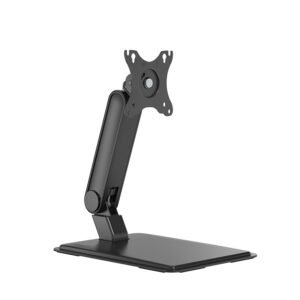
Freestanding Single Monitor Desk Stand
Family: Arms & Mounts Category: Monitor Stands Color: Matte Black
Replace a monitor’s original stand with a freestanding support that offers manual height positioning and screen-angle adjustment. The broad desktop base provides an installation option where a clamp or mounting hole is impractical.
Is This Right for You
For a single display that mainly stays at one chosen height. This stand is useful when the desk edge is inaccessible or you prefer a support that rests on the desktop. Allow sufficient surface area for the base and clearance for the screen.
Key Benefits
- A freestanding base requires no desk-edge clamp or mounting hole.
- Manual height positioning, tilt and swivel help set a suitable viewing position.
- A detachable VESA plate eases fitting, while cable clips and a phone slot in the base help organize the desk.
Compatibility and Installation
Fits one 17–32 inch monitor up to 9 kg without its original stand, using VESA 75 × 75 or 100 × 100 mm. Check mounting-screw depth, screen geometry and desk load capacity. Place the complete base on a level, stable desktop with room for the monitor’s intended movement.
Specifications and Adjustment
| Specification | Details |
| Screen / load | One 17–32 inch screen; up to 9 kg |
| VESA mounting | 75 × 75 or 100 × 100 mm; detachable plate |
| Installation / adjustment | Freestanding base; manual pole-height positioning |
| Screen movement | Tilt ±45°; swivel ±90°; rotation ±180° |
| Pole height | 420 mm; not the usable height-adjustment range |
| Overall dimensions | 390 × 280 × 454 mm |
| Construction / finish | Steel and plastic; powder-coated matte black |
| Organization features | Cable clips and a phone slot in the base |
Materials and Construction
A steel supporting structure and desktop base carry the screen, with plastic components and a powder-coated finish. The screen support is positioned manually on the upright. Cable clips guide leads along the stand; the base also provides a slot for holding a phone.
Setup and Everyday Use
- Assemble the base and upright on a level surface using the matching guide. Ensure the entire base rests on the desktop, away from its edge.
- Attach the VESA plate with screws suited to the monitor, then support the screen while securing it to the stand. Set the height as instructed and check that the support holds before releasing it.
- Adjust tilt, swivel and orientation within the available clearance. Keep cables slack and recheck balance whenever you change the screen’s position.
Limitations
The base takes up desk space. This is a manually positioned stand, without spring-assisted height movement. Screen geometry and off-center positioning can affect balance even below the load limit. Support the display while making adjustments, and lift the stand by its supporting structure when moving it, rather than pulling the screen.
Package and Mounting Options
Single-monitor stand with a freestanding base, upright, screen support, detachable VESA plate and cable-management parts. Confirm the supplied screws for your monitor. Monitor, phone and desk are not included.
Installation Guidance and Warranty
Contact Jianvo with your device and installation details for the matching instructions, compatibility guidance and applicable warranty terms.
Bulk Orders and Customization
Request a quote with this Jianvo SKU, quantity, destination and required configuration. Include packaging or branding requirements so availability and lead time can be confirmed.
Frequently Asked Questions
Does it attach permanently to the desk? No. Its base rests on a suitable desktop.
Can I use portrait orientation? Yes, if the monitor clears the desk and remains balanced over the base.
Is height adjustment spring-assisted? No. Support and position the monitor manually according to the guide.
Alternative Jianvo Products
Compare these single-monitor supports when the mounting method or adjustment style matters.
| Jianvo product | Shared purpose | When to choose it |
| JNV-MAR-019-01 Manual Single Monitor Desk Arm Matte Black |
Manual positioning of one 17–32 inch monitor up to 9 kg. | Choose clamp or grommet mounting to remove the base footprint. Requires a compatible desktop and fixing location. |
| JNV-MST-014-01 Adjustable Touchscreen Monitor Stand Matte Black |
Freestanding support for a single screen. | Choose spring assistance and a broader +100° / −15° tilt range for low-angle use. Fits 17–32 inch screens weighing 2–8 kg; no horizontal swivel. |
Reviews
There are no reviews yet.